


Candidate screening is the step between collecting applications and inviting people to interview. You check every applicant against the same short list of must-have requirements, hold a brief phone or video call with those who pass, and finish with a shortlist of three to five people worth interviewing. Set it up once and you can reuse it for every role.
Below is a six-step process you can run this week, with a screening matrix, knockout questions, a phone screen script and a copy-and-paste template.
What is candidate screening?
Candidate screening is the process of reviewing job applicants to decide who moves on to interviews. It checks three things: does the person meet the must-have requirements, do the practical details fit (pay, location, schedule, start date), and does their past work match the job's main tasks. Screening narrows the pool. Interviewing picks the hire.
People often mix screening up with the stages either side of it:


The candidate screening process in 6 steps
Step 1: Write your must-haves before you open a single application
Decide what a "yes" looks like before resumes start shaping your opinion. Pick three to five must-haves. These are knockouts: without them, the person can't do the job from day one.
Then list two or three nice-to-haves. These break ties. They never knock anyone out.
Here's an example for a customer support specialist:
Two rules keep this honest. First, every must-have should already be in your job post. If you never told applicants about a requirement, you can't fairly reject them for missing it. If your post is vague, fix it with our guide on how to write a job description.
Second, question every degree or "X years of experience" requirement. Ask whether someone could do the job well without it. If the answer is yes, move it to nice-to-haves. You'll widen your pool and stop screening out capable career changers.
Step 2: Pre-screen candidates with knockout questions
Pre-screening candidates means filtering applicants with a few yes or no questions before you read any resumes. Add two to four of these to your application form:
• Are you legally authorized to work in [country]?
• This role is on-site in [city], [days and hours]. Can you work this schedule?
• The pay range is [range]. Does that work for you?
• Do you hold [required license or certification]?
Keep the list short. Every extra question is one more reason for a good applicant to close the tab.
Some questions don't belong in screening at all. Don't ask about age, marital status, children, pregnancy, religion, health, disability or national origin. In the US, federal law bars hiring decisions based on characteristics like these, and asking about them invites a discrimination claim. Many states and cities also limit questions about salary history or criminal records at this stage, so check your local rules.
Step 3: Review resumes against a screening matrix
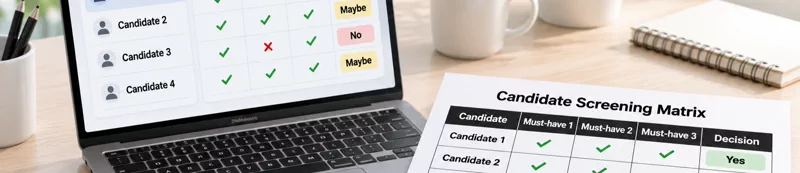
A screening matrix is a simple table with one row per applicant and one column per must-have. You mark each box, then make a Yes, Maybe or No call. It turns "I've got a good feeling about this one" into a decision you can explain.

A few habits make the matrix work:
• Review in one or two sittings. Your standard drifts when you read ten resumes on Monday and thirty on Friday.
• Look for evidence, not titles. "Handled 40+ tickets a day" tells you more than a clever job title.
• Write a reason for every No. If you can't write one, it's probably a Maybe.
• Hide names, photos and addresses if your tools allow it. It takes away information that has nothing to do with the job.
• Read career changers for skills, not job titles. A former teacher applying for a training role may have years of the exact work under a different name. If a resume is organized around skills instead of a job history, it's often a career change resume, and the evidence you need is in the skills section.
Step 4: Run a short phone or video screen
Call every Yes and your strongest Maybes. Keep it to 15 to 20 minutes and ask everyone the same questions in the same order. That's what makes the comparison fair. If you're hiring for a small team and want the whole process end to end, our small business hiring guide covers it.
Use this script:
Open (1 minute): "Hi [name], thanks for making time. This is a short call, about 15 minutes. I'll tell you a bit about the role, ask a few questions and leave time for yours. Sound good?"
The role (2 minutes): "[One-sentence summary of the job]. The pay range is [range], the schedule is [schedule], and it's [on-site in city / hybrid / remote]."
Your questions (10 minutes): use the questions below.
Their questions (3 minutes): "What would you like to know about the role or the team?"
Close (1 minute): "Thanks, [name]. We're finishing calls this week, and you'll hear from me by [day] either way."
Candidate screening questions to ask

Score each call straight after you hang up, in the same matrix. Save deeper questions for the interview stage.
Step 5: Add a skills check only when it tells you something new
A short work sample shows what a resume and a call can't. Use one when the core skill is easy to test and hard to judge by talking about it.
Keep it under an hour. Give everyone the same task and the same time limit, and score it with a rubric you wrote before you saw any answers. If a task takes longer, or produces work you could actually use, pay for it.
Step 6: Build your shortlist and close the loop
Pick three to five people to interview. If you have more than five strong Yeses, raise the bar on one nice-to-have rather than interviewing everyone.
Then tell everyone else. A short, polite no takes a minute to send, and candidates remember the employers who never replied. Here's a template:
Subject: Your application for [job title]
Hi [name],
Thank you for applying for the [job title] role at [company], and for your time on the phone. [Delete if there was no call.]
We've decided to move forward with candidates whose experience is a closer match for what we need right now. We'd be glad to hear from you for future roles, and we wish you the best with your search.
[Your name]
With your shortlist ready, plan the next round with our list of interview questions to ask candidates.
What if too few candidates pass screening?
If only one or two people pass, don't lower your must-haves to fill the gap. First check whether one of them is really a nice-to-have. Then widen the pool: share the role with your network, ask your team for referrals and contact suitable people directly instead of waiting for applications to arrive.
Direct outreach matters most for roles where good people are already employed and not looking. On Lobox, you can connect with professionals and recruiters directly, which gives you a way to reach people beyond your job post.
How do you make candidate screening fair?
Fair screening means every applicant is judged on the same job-related criteria, in the same way, with a reason you could explain to them. Write your criteria before you read applications, ask everyone the same questions, score before you discuss candidates and record a reason for every rejection. That protects candidates, and it protects you.
Use this as your fairness check for every role:
• Must-haves written before the role went live, and listed in the job post
• The same knockout questions for every applicant
• The same phone screen questions, in the same order
• Scores recorded straight after each call
• A reason noted for every No
• A second person reviews borderline Maybes
• No questions about protected characteristics
In the US, the EEOC enforces federal laws that ban hiring discrimination based on race, color, religion, sex (including pregnancy, sexual orientation and gender identity), national origin, age (40 or older), disability and genetic information. State and local laws often add more. This isn't legal advice, so check with an employment lawyer if you're unsure about a specific question.
Should you use AI for candidate screening?
AI candidate screening tools can sort and rank large numbers of applications quickly, but they can also repeat bias hidden in the data they learned from, and more places now regulate them. Use AI to organize and summarize applications, keep a person making the actual decision, and tell candidates when an automated tool is involved.
Some US rules already apply:
• New York City (Local Law 144): employers that use automated tools to screen candidates for hiring or promotion need an annual independent bias audit and must notify candidates.
• Illinois (HB 3773, in effect from 1 January 2026): employers must tell candidates when AI is used in hiring decisions, and can't use AI in a way that discriminates.
• California: regulations in effect since 1 October 2025 apply the state's anti-discrimination law to automated decision systems and require employers to keep related records for four years.
• Colorado: a replacement law signed in May 2026 (SB 26-189) applies to decisions made from 1 January 2027. It requires notice before use, a process for people affected by an adverse decision, and record keeping.
Before you switch on automated candidate screening, ask the vendor three questions. What exactly does the tool score on? Has it been bias-audited, and can you see the results? Can a person review and override every decision? Our guide to choosing recruitment software covers what else to check.
Common candidate screening mistakes
• Setting must-haves after reading resumes. The first strong resume quietly becomes the standard.
• Treating nice-to-haves as knockouts. You lose good people over things you could teach in a week.
• Changing questions from call to call. You end up comparing conversations, not candidates.
• Screening for "culture fit" without defining it. Undefined fit usually means "similar to us". Name the specific behaviors you need instead.
• Leaving people waiting. Strong candidates accept other offers while you're still deciding.
Candidate screening template
Copy this into a doc or spreadsheet for each new role:
ROLE:
HIRING MANAGER:
REPLY-TO-ALL-APPLICANTS DEADLINE:
MUST-HAVES (3 to 5, all listed in the job post)
1.
2.
3.
NICE-TO-HAVES (tie-breakers only)
1.
2.
KNOCKOUT QUESTIONS (application form, yes or no)
1. Work authorization:
2. Schedule and location:
3. Pay range:
4. Required license:
PHONE SCREEN (15 to 20 minutes, same order every time)
1. Typical day in current or last job
2. Why this role
3. Example of [main task]
4. Newest part of the job for them
5. Pay range check
6. Schedule check
7. Start date
8. Their questions
SKILLS CHECK (optional, under 1 hour, scored with a rubric)
Task:
Rubric:
SHORTLIST (3 to 5)
1.
2.
3.
Find candidates worth screening
A good screening process works best when the pool is strong to begin with. Join Lobox to connect with professionals and recruiters, and build the network your next hire comes from.
FAQ
How long should candidate screening take?
For one role, plan on a few minutes per resume and 15 to 20 minutes per phone screen. The bigger time cost is usually delay, not effort. Set a deadline to finish screening, block time in your calendar to do it in one or two sittings, and reply to every applicant once you've built your shortlist.
What questions should you ask when screening candidates?
Ask about their current or last job, why they applied, a real example of the job's main task and which part of the role would be new to them. Then confirm the practical details: pay range, schedule, location and start date. Ask every candidate the same questions in the same order so you can compare answers fairly.
What is the difference between screening and selection?
Screening removes applicants who don't meet the basic requirements and produces a shortlist. Selection happens after that, through interviews, work samples and reference checks, and ends with choosing one person. Screening asks "should we talk to them properly?" Selection asks "who is the best person for this job?"
Can you screen candidates without a phone call?
Yes. For high-volume roles, you can rely on knockout questions in the application form plus a short written or recorded question instead of a live call. It saves time, but you lose the chance to clear up unclear answers. For senior or customer-facing roles, a live 15-minute call is usually worth it.
Is it legal to use AI to screen candidates?
In most of the US, yes, but the rules are growing. New York City requires an annual bias audit and candidate notice for automated hiring tools, Illinois requires notice when AI is used in hiring decisions, and other states regulate it too. Anti-discrimination laws apply whether a person or a tool makes the call.
What does pre-screening candidates mean?
Pre-screening is the first filter, applied before anyone reads a resume in detail. It usually means two to four yes or no questions in the application, covering work authorization, schedule, location, pay range or a required license. Anyone who answers no to a true requirement is screened out automatically, which saves you reading time.